몇일 전에.. 엑셀파일의 속성 정보를 일괄로 변경하는 python script를 간단히 작성했었다.
https://nooneelseme.tistory.com/244
엑셀파일 정보를 일괄로 변경해보기.
엑셀파일을 아무거나 하나 열어서 파일탭의 정보를 눌러보면 아래와 같이 해당 엑셀파일에 대한 정보가 나오게 된다.우측 속성에 보면 눈에 띄는 정보가 만든이가 있는데 회사에서 일을 하다
nooneelseme.tistory.com
이번에는 모든 오피스 파일에 대해서(엑셀/파워포인트/워드 3가지..) 해당 작업을 하는 코드를 추가해보았다.
pptx와 docx를 다룰 수 있도록 하는 패키지는 아래와 같이 python-pptx, python-docx 2가지의 패키지가 있다. (하기 주소 참조..)
https://python-pptx.readthedocs.io/en/latest/
https://python-docx.readthedocs.io/en/latest/
https://openpyxl.readthedocs.io/en/stable/
그리고 xlsx 은 openpyxl을 이용하였었고..
pptx와 docx 의 속성을 일단 파일을 open 한 후에 core_properties의 author 및 last_modified_by 값을 통해서 변경하고자 하는 문서의 속성(작성자 및 마지막 수정자)을 변경할 수 있다.
코드는 아래와 같다..
import sys
import tkinter as tk
import tkinter.ttk as ttk
import tkinter.filedialog as fd
from tkinter import *
from tkinter import messagebox
from unicodedata import normalize
import os
import traceback
import clipboard

import openpyxl
from openpyxl import Workbook
from openpyxl import load_workbook
from openpyxl.styles import PatternFill, Border, Side, Alignment, Protection, Font, Color
from openpyxl.styles.borders import Border, Side
from openpyxl.drawing.image import Image
from openpyxl.cell.text import InlineFont
from openpyxl.cell.rich_text import TextBlock, CellRichText
from openpyxl.worksheet.datavalidation import DataValidation
from openpyxl.comments import Comment
from openpyxl.worksheet.properties import WorksheetProperties, PageSetupProperties
from openpyxl.packaging.extended import ExtendedProperties

from pptx import Presentation
from docx import Document

recursive_level = 0
all_file_count = 0
current_count =0
offset=16

root = tk.Tk()
root.geometry('450x430')
root.title('All Office files property automatic changer.')
root.resizable(False, False)

path = os.path.join(os.path.dirname(__file__), 'icon.ico')
if os.path.isfile(path):
    root.iconbitmap(path)


frame = tk.Frame(root)
frame.pack()

txt = Label(root, pady=offset, text="Path : Please set Path to click SetPath button")
txt.pack()

def getDir():
    root.dirName = fd.askdirectory()
    root.dirName.replace("/", "\\")
    print("GetDirPath : "  + root.dirName)
    getAllFilesCount(root.dirName)
    txt.configure(text="Path : "+root.dirName)
    btn2.configure(state='normal')

def getAllFilesCount(dirname):
    global all_file_count
    filenames = os.listdir(dirname)
    for filename in filenames:
        tempname = os.path.join(dirname, filename)
        all_file_count+=1

        if os.path.isdir(tempname):
            getAllFilesCount(tempname)


btn = Button(root, width=100, pady=offset, text="SetPath", command=getDir)
btn2 = Button(root, width=100, pady=offset, text="Start Property Change!", command=lambda: change_property_office_file(root.dirName))
btn.pack()
btn2.pack()
btn2.configure(state='disabled')

pb_var = DoubleVar()
pb = ttk.Progressbar(root, maximum=100, length=450, variable=pb_var, mode="determinate")
pb.pack(ipady=20)

def change_property_office_file(dirname):
    global recursive_level
    global all_file_count
    global pb
    global current_count

    author = 'SAMPLE'
    modifier = 'SAMPLE'

    recursive_level += 1
    filenames = os.listdir(dirname)
    for filename in filenames:
        current_count+=1
        pb_var.set(current_count/all_file_count * 100)
        pb.update()

        full_filename = os.path.join(dirname, filename)
        filename2, fileExtention = os.path.splitext(filename)
        if os.path.isdir(full_filename):
            change_property_office_file(full_filename)
        elif fileExtention == '.xlsx':
            wb = load_workbook(full_filename)
            print("File : " + full_filename + " creator : " + wb.properties.creator + " lastModifier : " + wb.properties.lastModifiedBy)
            wb.properties.creator = author
            wb.properties.lastModifiedBy = modifier
            wb.save(full_filename)
        elif fileExtention == '.pptx':
            parsed = Presentation(full_filename)
            print("File : " + full_filename + " creator : " + parsed.core_properties.author + " lastModifier : " + parsed.core_properties.last_modified_by)
            parsed.core_properties.author = author
            parsed.core_properties.last_modified_by = modifier
            parsed.save(full_filename)
        elif fileExtention == '.docx':
            parsed = Document(full_filename)
            print("File : " + full_filename + " creator : " + parsed.core_properties.author + " lastModifier : " + parsed.core_properties.last_modified_by)
            parsed.core_properties.author = author
            parsed.core_properties.last_modified_by = modifier
            parsed.save(full_filename)

    recursive_level -= 1
    if recursive_level==0:
        messagebox.showinfo("Info", "Processing Complete!")


root.mainloop()
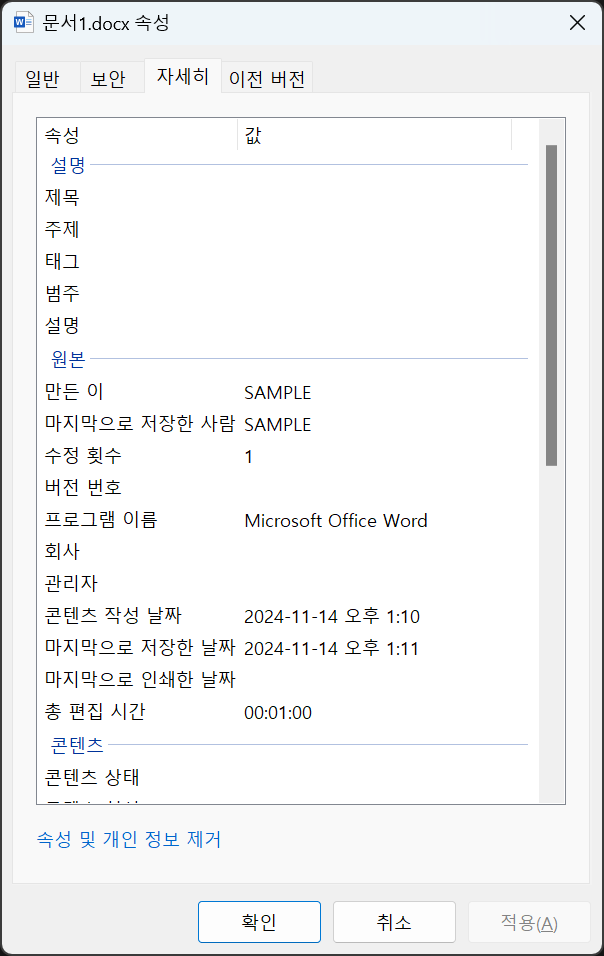
확장자를 검사하여 처리하는 부분에 pptx 와 docx 를 검사하는 코드를 추가하였고 해당 케이스의 경우에 알맞게 파일을 열어서 수정하도록 하였다.
수행해보면 아래와 같이 속성이 변경된 것을 확인할 수 있다..
(굳이 워드나 파워포인트 엑셀 등으로 수행해서 속성을 확인하지 않아도 탐색기에서 해당파일의 속성을 보아도 변경된 것을 확인할 수 있다..)
'STUDY' 카테고리의 다른 글
| Python으로 Office file property 변경 및 텍스트 찾기 바꾸기 일괄 자동수행. (1) | 2024.11.29 |
|---|---|
| LLM AI에게 문서요약 물어보기... (0) | 2024.11.20 |
| 엑셀파일 정보를 일괄로 변경해보기. (1) | 2024.11.10 |
| 난 자전거 Cadence를 몇으로 탔나..? (3) | 2024.10.05 |
| Resilience / 回復彈力性 讀書感想文 (1) | 2024.02.11 |


댓글